Forge Lexicon

Also known as a Thesoreus.
A Forge Lexicon is an item that converts items into other items that are considered equivalent. Examples of equivalent items are the various versions of copper and tin ingots added by different mods.
Obtaining
Crafting
| Ingredients | Crafting recipe |
|---|---|
| Lapis Lazuli + Gold Ingot + Book + Iron Ingot + Redstone |      |
Usage
Modes
A Forge Lexicon can be in one of two modes: ‘knowledge’ and ‘transmutation’. It is initially in knowledge mode. The mode can be switched by pressing “Cycle Item Mode” (V by default).
Knowledge
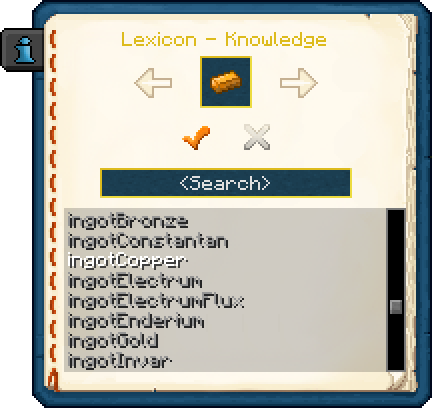
When a Forge Lexicon is used while in knowledge mode, an interface is opened that allows the user to study the available groups of equivalent items, and to set which items in these groups they prefer. These preferences are used when the Lexicon is in transmutation mode.
Transmutation
A Forge Lexicon in transmutation mode in a user’s inventory converts any interchangeable items that are picked up into the user’s preferred equivalents. If the user has not set a preferred equivalent for an item, it is converted into the first of its available equivalents.
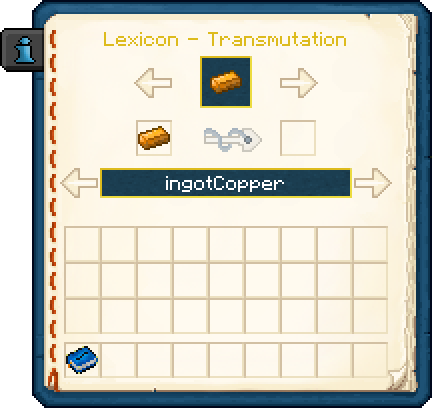
When a Forge Lexicon is used while in transmutation mode, an interface is opened that allows the user to convert items into their equivalents by hand.
Crafting ingredient
| Result(s) | Ingredients | Crafting recipe |
|---|---|---|
| Lexical Transmuter | Forge Lexicon + Lead Ingot + Device Frame + Iron Gear + Redstone Servo |      |
Trivia
- Forge Lexicons are named after the Minecraft Forge modding API, which provides a system to register interchangeable items for compatibility between mods.
| Thermal Foundation (Minecraft 1.12) | |||||||||||||||||||
|---|---|---|---|---|---|---|---|---|---|---|---|---|---|---|---|---|---|---|---|
| World | |||||||||||||||||||
| Ores | |||||||||||||||||||
| Fluid Ores | |||||||||||||||||||
| Mobs | |||||||||||||||||||
| Items | |||||||||||||||||||
| Materials |
| ||||||||||||||||||
| Utilities |  Crescent Hammer ∙ Crescent Hammer ∙  Multimeter ∙ Multimeter ∙  Upgrade Kits ∙ Upgrade Kits ∙  Conversion Kits ∙ Conversion Kits ∙  Signalum Security Lock ∙ Signalum Security Lock ∙  Redprint ∙ Forge Lexicon ∙ Redprint ∙ Forge Lexicon ∙  Tome of Knowledge ∙ Tome of Knowledge ∙  Phyto-Gro ( Phyto-Gro ( Rich ∙ Rich ∙  Fluxed) ∙ Fluxed) ∙  Aqua-Chow ( Aqua-Chow ( Rich ∙ Rich ∙  Fluxed) Fluxed) | ||||||||||||||||||
| Blocks | |||||||||||||||||||
| Storage | |||||||||||||||||||
| Other | |||||||||||||||||||
| Fluids | |||||||||||||||||||
| Molten | |||||||||||||||||||
| Elemental | |||||||||||||||||||
| Fossil | |||||||||||||||||||
| Bio | |||||||||||||||||||
| Tree | |||||||||||||||||||
| Other | |||||||||||||||||||
| Equipment | |||||||||||||||||||
| Tools | |||||||||||||||||||
| Weapons | |||||||||||||||||||
| Armor | |||||||||||||||||||
| Other | |||||||||||||||||||


Last updated: 2026-10-28 13:33:26 +0000